Big Sur Technologies’ acquisition of Alliance IT likely means broader managed IT coverage, more standardized service delivery, and potentially deeper bench strength across Bradenton, Sarasota, and Venice. For small and mid-sized businesses, the practical takeaway is simple: use this kind of market change to reassess whether your current IT support model still gives you the response times, local coverage, security discipline, and accountability your business actually needs.
Key takeaways
- A managed IT acquisition usually matters less for the press headline than for how it changes support coverage, staffing continuity, response times, and service scope for local businesses.
- Small and mid-sized businesses should treat MSP consolidation as a trigger to review contracts, escalation paths, cybersecurity responsibilities, and tool ownership before renewing or switching providers.
- The right IT services partner is not just the one with more locations, but the one that can document service levels, onboarding steps, asset visibility, backup testing, and clear accountability.
- Businesses evaluating a newly expanded provider should ask practical questions about who answers after-hours incidents, what gets standardized after the acquisition, and whether local technicians remain available.
- Typical IT transitions are smoother when companies first inventory users, devices, vendors, admin credentials, backup systems, and compliance needs before engaging a new managed services partner.
Why this regional IT services acquisition matters to SMBs
When one managed services provider acquires another, business owners should look past the announcement itself and focus on what usually changes behind the scenes. In practice, these deals often affect technician availability, after-hours support, ticket routing, cybersecurity tooling, vendor relationships, and the consistency of onsite service. If your company relies on outsourced IT for day-to-day operations, those changes can either improve stability or introduce friction during the transition period.
For companies in Southwest Florida and similar regional markets, this specific kind of expansion can be meaningful because many SMBs still need a mix of remote support and onsite help. A provider with a larger local footprint may be better equipped to handle office moves, network troubleshooting, device rollouts, conference room issues, Wi-Fi dead zones, printer and line-of-business app support, and hands-on troubleshooting that cannot be solved through remote access alone. At the same time, expansion can lead to tool consolidation, process changes, and staff turnover, which means customers should verify how service continuity will actually work.
In our experience, the main question is not whether bigger is automatically better. The real question is whether the enlarged provider can translate size into reliable service operations: documented onboarding, strong dispatching, clear escalation tiers, disciplined patching, tested backups, and predictable communication. Those are the things that matter when your payroll system is inaccessible, Microsoft 365 is misconfigured, or a firewall failure takes down a location.
What usually changes after an MSP acquisition
Most acquisitions in the IT services space are followed by a standardization phase. The new combined organization typically tries to unify remote monitoring and management platforms, ticketing systems, security stacks, documentation standards, endpoint management tools, and vendor contracts. For customers, that can be a net positive if it replaces ad hoc support with a more mature operating model. It can also create short-term confusion if old contacts change, service queues are reorganized, or existing tools are replaced before the transition is well communicated.
That is why decision-makers should understand the operational implications, not just the branding change. If your existing MSP has been acquired, ask what will remain the same over the next 30, 60, and 90 days. Will your help desk number change? Will field technicians still be assigned by geography? Will there be changes to your Microsoft 365 tenant administration, endpoint security agent, firewall management process, or backup platform? If there is a network outage at 7 p.m., who picks up the incident and how is it escalated?
Common post-acquisition changes businesses should watch for
- Support structure: a move from direct technician relationships to a centralized help desk or tiered support model.
- Tooling: migration to a different remote management platform, EDR product, backup solution, or documentation system.
- Contracts: revised service bundles, minimum seat counts, term lengths, or out-of-scope billing rules.
- Coverage area: improved onsite reach, but sometimes longer scheduling windows if dispatching is centralized.
- Cybersecurity ownership: clearer or sometimes more limited responsibility for patching, monitoring, MFA enforcement, and incident response.
- Account management: a new vCIO, service manager, or account lead with different planning cadence and reporting practices.
None of these changes are automatically good or bad. What matters is whether they are documented, communicated, and aligned with your operating needs.
What this means for IT services decisions at US small and mid-sized businesses
For SMBs evaluating any technology partner, regional consolidation is a useful signal that the managed IT market is maturing. Providers are trying to combine local presence with standardized service operations. That often benefits businesses that have outgrown break-fix support and now need a more disciplined model: asset lifecycle planning, user onboarding and offboarding, patch management, vendor coordination, security baselines, backup oversight, and predictable response processes.
At the same time, a larger provider is not the right fit for every organization. A 15-person professional services firm may value direct access to a familiar engineer who knows its QuickBooks environment, document workflows, and office network. A 150-user multi-site business may instead need formal service-level commitments, procurement support, Microsoft 365 governance, identity management, VLAN segmentation, firewall policy review, and quarterly roadmap planning. Your IT partner choice should reflect the complexity of your environment, not the provider’s marketing footprint.
There is also a procurement implication. When the market changes, businesses should compare providers less on broad claims like “24/7 support” and more on how support is actually delivered. Ask to see sample monthly reports. Ask how they document assets, passwords, warranties, admin accounts, and vendor dependencies. Ask whether they support Microsoft Intune, Entra ID, Apple Business Manager, Google Workspace, Ubiquiti or Cisco networking, SentinelOne or Microsoft Defender for Business, and common backup platforms such as Datto, Veeam, or Cove. Specifics reveal operational maturity; generic promises do not.
A practical decision framework for evaluating your current or next MSP
If this news prompts you to revisit your IT services strategy, use a structured review instead of reacting to the headline. The goal is to determine whether your business has the right service model, risk coverage, and support depth for the next 12 to 24 months. Owners and operations leaders often make better decisions when they review business impact first, then technical delivery, then contract fit.
Step 1: Define what your business cannot afford to have fail
List the systems that stop revenue, operations, or customer service when they go down. For many SMBs, that includes Microsoft 365, internet connectivity, firewalls, line-of-business apps, file access, VoIP, payment systems, and endpoint security. If you operate multiple sites, add site-to-site connectivity, wireless reliability, and shared authentication services.
Step 2: Map your current support model
Document who currently handles the following: user provisioning, password resets, device setup, patching, backup monitoring, vendor liaison work, network changes, Microsoft 365 administration, and emergency response. Many businesses discover that key responsibilities are split between an MSP, an internal admin, a departing employee, and third-party software vendors. That fragmentation creates risk.
Step 3: Verify service accountability in writing
- Response and resolution expectations: Not just “fast support,” but how priority levels are defined and escalated.
- Coverage hours: Business hours only, after-hours emergency support, or full 24/7 monitoring and response.
- Onsite support terms: Included, scheduled, or billed separately; travel zones and dispatch windows should be clear.
- Security responsibilities: MFA enforcement, vulnerability remediation, EDR monitoring, phishing response, and user offboarding.
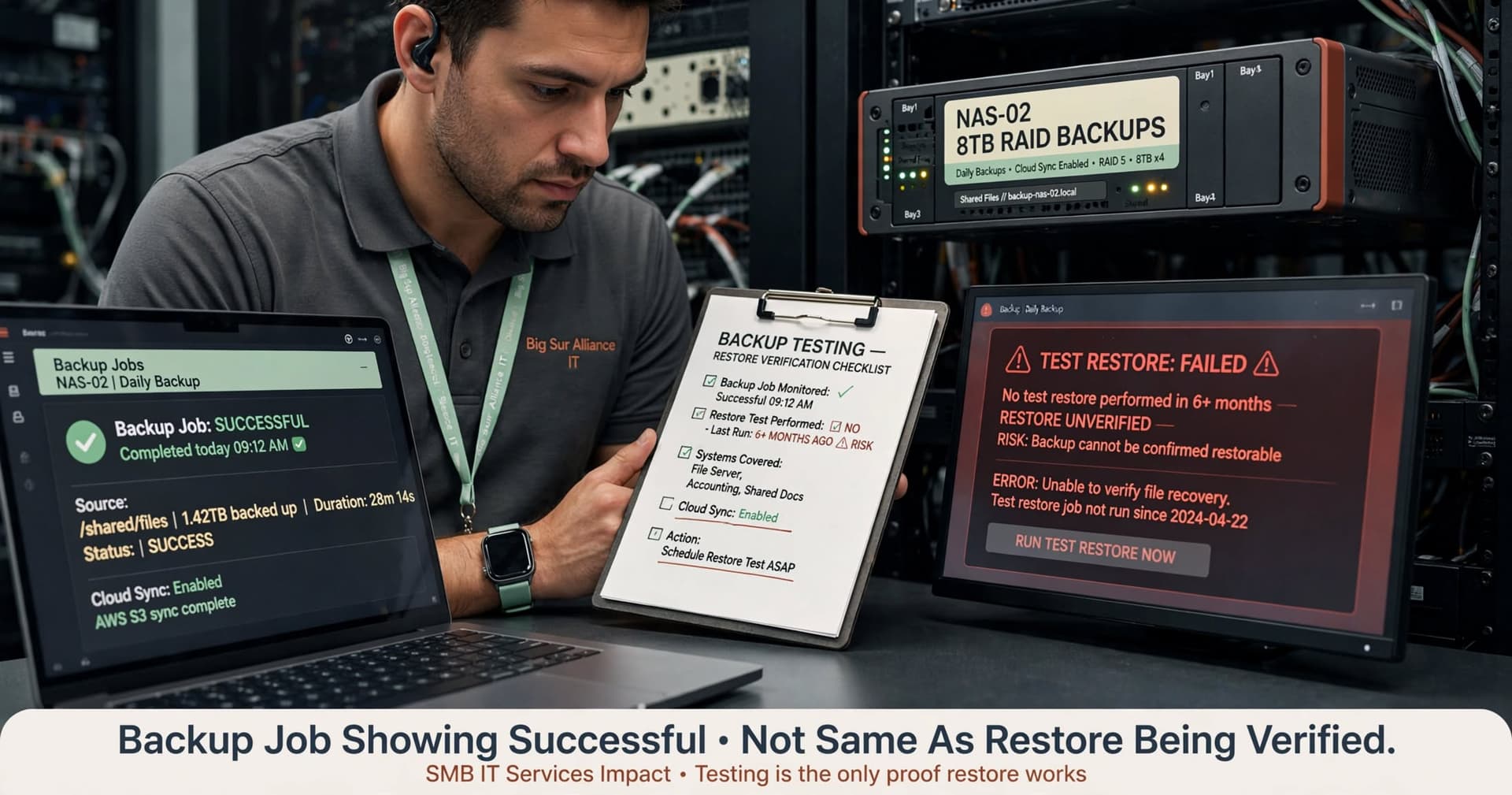
- Backup and recovery: Who monitors jobs, who tests restores, and what systems are covered.
Step 4: Evaluate tool maturity and documentation quality
A capable provider should be able to explain its stack and why it uses it. That includes PSA/ticketing, RMM, endpoint protection, MDM, backup, password vaulting, network monitoring, and documentation. More important, it should be able to transition that knowledge to your business in an orderly way if the relationship ends.
Step 5: Check cultural and communication fit
Even strong technical teams can be a poor fit if they communicate badly with nontechnical stakeholders. Ask how they handle recurring issues, executive reporting, budgeting recommendations, and user education. At BCW Technology Solutions, we have found that businesses are usually happiest when the provider can speak clearly to both leadership and frontline staff without hiding behind jargon.
What to ask before staying with or switching to a larger provider
If your current MSP has been acquired, or if you are considering a newly expanded provider, the most useful questions are operationally specific. Avoid yes-or-no questions and ask for process details. The way a provider answers will often tell you more than the answer itself.
Questions that reveal real service quality
- Who owns our account day to day? Ask whether you will have a named service manager, vCIO, dispatcher, or primary escalation contact.
- What happens during a priority-one outage? Ask for the exact escalation path, including after-hours handling and estimated technician involvement.
- How are devices and users onboarded? Look for a repeatable process using standards such as Intune, Autopilot, Apple Business Manager, MFA enrollment, least-privilege access, and documented acceptance checks.
- What is included versus billable? Clarify projects, onsite work, after-hours labor, vendor coordination, new user setup, license management, and hardware procurement support.
- How do you manage documentation and credential access? You should know where diagrams, admin access, ISP details, warranty records, and vendor contacts are stored and how you can retrieve them.
- What gets standardized after the acquisition? This helps uncover whether your current tools or local support contacts may change soon.
Also ask for examples of how the provider handles common SMB scenarios. For example: an employee leaves unexpectedly and needs all access revoked the same day; a branch office loses connectivity before opening; a failed Microsoft 365 conditional access policy locks out users; a server or NAS hosting shared files needs urgent restoration. Providers that can calmly walk through these workflows tend to have stronger internal discipline.
Typical timelines and costs vary widely by user count, site count, compliance needs, and technical debt. As a rough planning guide, a straightforward MSP onboarding for a small office may take a few weeks, while a more complex multi-site environment with cleanup work can take a month or more. Costs are often structured per user, per device, or as a blended managed services agreement, with separate project fees for larger remediation or migration work. The important point is not finding the cheapest model; it is understanding what work is truly included.
Common pitfalls SMBs should avoid right now
The biggest mistake we see is assuming continuity without verifying it. Businesses hear that a provider has expanded and assume this automatically means more capability with no disruption. In reality, acquisitions can improve capacity while still creating temporary issues around communication, technician turnover, standardization, and contract changes. If your business is heavily dependent on outsourced IT, hope is not a plan; documented expectations are.
Another common pitfall is buying managed IT as if it were a commodity. Two providers can both advertise managed support, Microsoft 365 help, cybersecurity tools, and monitoring, yet deliver very different outcomes. One may proactively review failed backups, stale accounts, unsupported endpoints, firewall firmware, warranty expirations, and licensing gaps. Another may only respond when users open tickets. Those are not equivalent services, even if the proposals look similar.
Pitfalls to avoid in the next review cycle
- Not inventorying assets first: You cannot evaluate support scope if you do not know what users, devices, sites, and systems exist.
- Ignoring admin access ownership: Make sure your company, not just the provider, has access to core systems and tenant-level accounts.
- Overlooking backup testing: A backup job showing “successful” is not the same as a restore being verified.
- Failing to separate projects from support: Network redesign, server migrations, office moves, and tenant cleanups should be scoped explicitly.
- Choosing on personality alone: Good rapport matters, but so do process maturity, documentation, and service accountability.
A sound next step for any SMB is an internal review meeting involving ownership, operations, and whoever oversees technology. Confirm business priorities, identify support pain points from the past six to twelve months, and compare those needs against your provider’s actual delivery. Whether you stay put or change partners, that exercise usually improves outcomes because it turns IT support from a reactive expense into an operating decision with clear standards.
The bottom line for businesses in a changing IT services market
News like Big Sur Technologies acquiring Alliance IT is best viewed as a market signal, not a conclusion. It suggests that managed IT providers see value in broader local coverage and more scalable service delivery. For SMBs, that should trigger practical questions: will support become more reliable, more standardized, and better documented for my business, or just more centralized and less personal?
The best response is not urgency for its own sake. It is disciplined due diligence. Review your current environment, clarify business-critical systems, verify who owns what, and ask providers detailed operational questions before you sign, renew, or stay silent. Businesses that do this well usually end up with more than help desk support; they gain a partner that can keep users productive, reduce avoidable outages, and provide a steadier foundation for growth.
Frequently Asked Questions
Does an MSP acquisition usually improve service for small businesses?
It can, especially if the combined provider gains better coverage, deeper technical staffing, and more mature support processes. However, service can also become less personal or temporarily disrupted during tool migrations, staff changes, or policy standardization, so businesses should verify specifics rather than assume improvement.
What should an SMB review first when its IT provider is acquired?
Start with support continuity: account contacts, help desk procedures, escalation paths, onsite coverage, and contract terms. Then review technical ownership of core systems such as Microsoft 365, firewalls, backups, endpoint security, and admin credentials to make sure your business remains in control.
Is a larger managed IT provider always a better choice than a smaller local firm?
No. A larger provider may offer broader coverage and more formal processes, while a smaller firm may provide more direct relationships and flexibility. The better choice depends on your user count, number of locations, compliance needs, business hours, and tolerance for downtime.
How long does it typically take to transition to a new managed IT services provider?
A relatively simple small-business transition can often be organized over a few weeks, while a more complex environment with multiple sites, outdated systems, or poor documentation may take a month or longer. The timeline usually depends on asset cleanup, credential recovery, tool deployment, and how much standardization is needed at the start.
Work with BCW Technology
Planning a project around this? We help small and mid-sized businesses across the USA ship it. Explore our services and portfolio, request a quote, or get in touch.