Mobile app development is changing because buyers and employees now judge apps less by how many features they offer and more by how easy, fast, and reliable they feel in real use. For US small and mid-sized businesses, that means mobile decisions should start with user journeys, task completion, and operational fit—not a long feature wishlist. The practical next step is to define the few mobile moments that matter most, then build around those with strong UX, performance, security, and maintainability.
Key takeaways
- For most small and mid-sized businesses, the best mobile app is no longer the one with the most features; it is the one that reduces friction in the moments users care about most.
- Mobile development decisions should start with user journeys, performance, and adoption goals before teams commit to a platform, framework, or release scope.
- A smaller, better-designed v1 usually outperforms a feature-heavy launch that is slow, confusing, or hard to maintain.
- Typical mobile app budgets and timelines vary widely, but experience-focused projects often control cost better because they prioritize core workflows instead of building everything at once.
- Accessibility, offline behavior, authentication, analytics, and app store readiness are no longer nice-to-haves; they directly affect whether a mobile app succeeds in practice.
Why this shift matters now for SMB mobile strategy
For years, many app projects were scoped like checklists: login, dashboard, notifications, reporting, chat, payments, maps, admin tools, and more. That approach often produced large backlogs and bloated first releases. The market signal this week reflects a broader reality we see across mobile projects: users rarely reward businesses for having the longest feature list. They reward them for helping them complete a task quickly, clearly, and without friction.
That matters even more for small and mid-sized businesses because budgets, timelines, and internal support capacity are tighter than in large enterprises. If your sales team needs a field app, your customers need a reorder flow, or your technicians need job updates on the go, a smooth experience has direct business value. Faster task completion, fewer support calls, better adoption, lower training effort, and fewer abandoned workflows are often more important than adding five extra screens nobody uses.
In practice, this changes how mobile projects should be approved. Instead of asking, What features should our app include? ask: What high-value action must become easier on a phone? For a distributor, that may be order lookup and reorder. For a service company, it may be dispatch updates, proof of service, and photo capture. For an internal app, it may be approvals, time tracking, or inventory checks with poor connectivity. Experience-led mobile development narrows the scope to what users truly need in context.
What “experience-first” means in real mobile development work
Experience-first is not just visual design. It includes how quickly screens load, whether forms are easy to complete with one hand, whether the app works on a weak signal, whether users can recover from errors, and whether the steps make sense for a small screen. On mobile, tiny delays and awkward flows are amplified. A process that is tolerable on desktop can become frustrating on a phone after a few taps.
For business decision-makers, the most useful way to think about this is through mobile moments. A mobile moment is a narrow, high-intent situation: a customer trying to reschedule an appointment while commuting; a warehouse employee checking stock from the floor; a manager approving an expense between meetings. If the app supports those moments well, users perceive it as valuable even if the overall feature set is modest. If it fails in those moments, extra features will not rescue it.
In delivery terms, experience-first usually means:
- Shorter critical paths: fewer steps from opening the app to completing the main task.
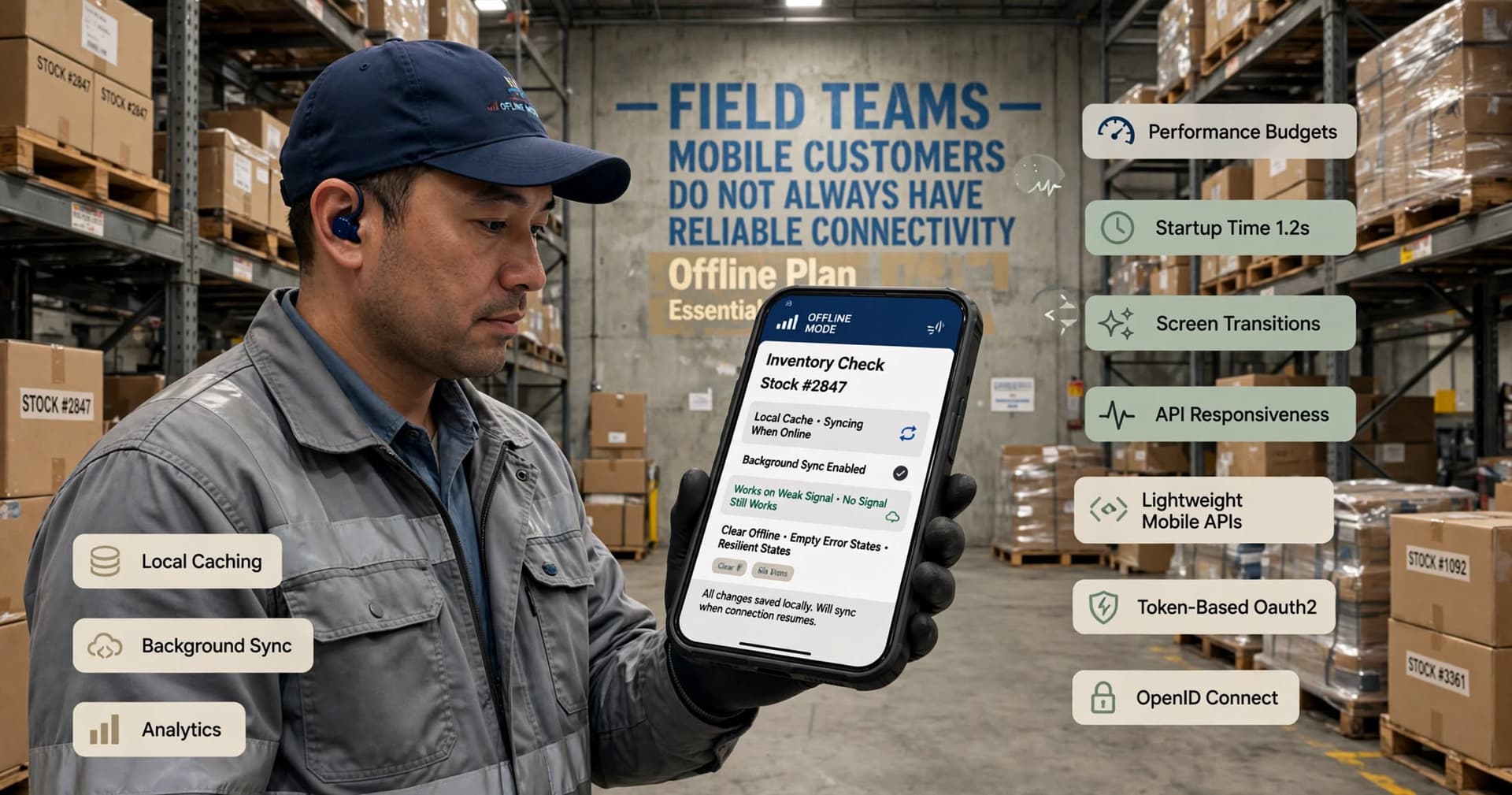
- Performance budgets: teams set expectations for startup time, screen transitions, image handling, and API responsiveness.
- Resilient states: clear loading, offline, empty, and error states rather than assuming perfect connectivity.
- Mobile-native interactions: camera, barcode scanning, biometrics, push notifications, location, and file upload used only where they genuinely remove friction.
- Accessible design: readable typography, contrast, touch target size, screen-reader support, and predictable navigation.
These are product decisions, not just design polish. They affect architecture, testing, support, and long-term maintenance from day one.
How this changes platform and architecture decisions
When businesses shift from feature count to experience quality, technology choices become more grounded. The first question is not “Should we build native or cross-platform?” It is “What does the user need the app to do, under what conditions, and at what quality bar?” The answer drives whether native iOS and Android, or a cross-platform stack such as Flutter or React Native, makes the most sense.
For many SMB use cases, cross-platform development is a sensible option because it can speed delivery and reduce duplication across iOS and Android. Flutter is often strong when consistent UI across platforms matters and teams want a single codebase with solid performance. React Native can be effective when organizations already have JavaScript or TypeScript talent and want to move quickly with shared patterns. Native Swift for iOS and Kotlin for Android still make sense when the app depends heavily on platform-specific behavior, advanced device integration, very polished interactions, or long-term optimization at scale.
Architecture also matters more than many buyers expect. Experience degrades quickly when apps depend on chatty APIs, oversized payloads, or legacy back ends that were never designed for mobile use. A better approach may include lightweight mobile APIs, token-based authentication using OAuth 2.0 or OpenID Connect, local caching, background sync, and analytics instrumentation from the start. If users will work in the field, offline-first patterns can be essential. If the app includes checkout or account access, secure session handling, encryption in transit, and careful secrets management are non-negotiable.
Typical platform questions an SMB should resolve early include:
- Will users be employees, customers, partners, or a mix?
- Do they need iPhone, Android, or both at launch?
- Is offline access required for any critical workflow?
- Does the app need camera, barcode scanning, GPS, Bluetooth, Apple Pay, Google Pay, or file attachments?
- Will the app connect to ERP, CRM, scheduling, e-commerce, or identity systems?
- Is app store distribution required, or is managed internal distribution enough?
These decisions are easier and cheaper when made around experience goals instead of assumptions.
A practical decision framework for SMBs planning a mobile app
If you are evaluating a new mobile app or a redesign, use a structured decision process. In our experience, the biggest SMB mobile mistakes come from skipping discovery and jumping straight into design comps or development quotes. A clear framework reduces rework and helps compare vendors on substance rather than presentation.
Step 1: Define the core job
Write one sentence that describes the app’s primary purpose on mobile. Example: “Help service technicians receive assignments, capture job notes, and submit proof of completion from the field.” If that sentence is broad or vague, the scope is probably too large.
Step 2: Identify the top three user journeys
Map the exact steps users take today, including delays, handoffs, and workarounds such as texts, spreadsheets, screenshots, or paper forms. Then define the ideal mobile path. This is where hidden complexity appears: permission rules, exceptions, attachments, approvals, retries, and offline use.
Step 3: Prioritize experience outcomes
Choose the measures that matter operationally. Examples include account setup completion, successful reorder submission, form completion time, reduction in support tickets for a specific task, or percentage of field jobs closed from mobile. You do not need elaborate metrics; you do need clarity.
Step 4: Choose platform and scope
Decide whether the first release should be native or cross-platform, customer-facing or internal, app store or private distribution, and what belongs in v1 versus later phases. A focused v1 is usually the right move.
Step 5: Validate with prototype and technical discovery
Before full build, test the most important flows with users and confirm back-end feasibility. This is where teams should assess API readiness, identity integration, data model constraints, mobile device policy, and analytics needs.
Step 6: Build release readiness into the plan
Include QA across devices, accessibility checks, crash monitoring, app store assets, privacy disclosures, and support ownership. Many delays happen late because release preparation was treated as an afterthought.
Used well, this framework keeps the conversation centered on business value and user success, not feature inflation.
Common mobile app mistakes when companies chase features
The most common problem is trying to make the mobile app a smaller version of the entire business system. That usually leads to crowded navigation, slow screens, and inconsistent usage. Mobile is best when it is opinionated. It should support the right tasks in the right context, not every possible task for every possible user.
Another frequent mistake is underestimating integration work. Many SMBs assume that if a system has an API, mobile integration will be straightforward. In reality, the app may need different data shapes, better authentication flows, pagination, image handling, push token management, or event-driven updates. Legacy systems can be especially tricky because they were built for desktop workflows, not intermittent mobile sessions.
Watch for these pitfalls:
- Designing for stakeholders instead of users: internal teams often request dashboards and controls that users never touch.
- Ignoring onboarding: if first-time setup, permissions, or account verification is clumsy, adoption suffers.
- No offline plan: field teams and mobile customers do not always have reliable connectivity.
- Weak QA coverage: apps fail in edge cases like camera permissions, backgrounding, older devices, and network transitions.
- Poor notification strategy: too many pushes train users to ignore all of them.
- Accessibility deferred to later: fixing structure and interaction patterns late is more expensive.
We also see teams spend heavily on launch and too little on iteration. Real mobile quality emerges through release cycles: analyzing drop-off points, refining flows, fixing crash patterns, and improving based on observed usage. A successful app is usually not the one that launches with the most functionality; it is the one that learns fastest from real users.
Budget, timeline, and team implications of experience-led development
Experience-first does not necessarily mean more expensive. In many cases, it is the opposite because it prevents businesses from paying to build low-value functionality. What changes is where the effort goes. More time is invested upfront in discovery, workflow mapping, UX, prototyping, architecture, and testing. Less time is wasted on features that looked good in planning but never mattered in the field.
Typical estimates vary by complexity, integrations, and whether the app is internal or public. A focused internal workflow app with straightforward authentication and a limited feature set may take a few months. A customer-facing app with polished UX, payments, account management, analytics, push notifications, and integrations often takes longer and requires phased delivery. Budgets can range from modest five figures for tightly scoped work to much more for robust multi-platform products with significant back-end and compliance needs. These are planning ranges only; the point is that experience discipline helps control cost by protecting scope.
The right team usually includes product strategy, UX/UI design, mobile engineering, back-end or integration support, QA, and release management. If the app touches sensitive data, add security review early. If it supports regulated workflows, involve compliance stakeholders during discovery, not before launch. At BCW Technology, we advise clients to budget for post-launch maintenance as part of the product, not as a separate surprise. Mobile operating systems change, app store policies evolve, devices vary, and user expectations do not stand still.
What SMBs should do next this week
If this trend has changed how you think about mobile, the best response is not a rushed rebuild. It is a tighter planning cycle focused on experience quality. Start by reviewing any current app, app idea, or mobile-dependent process through the lens of friction: where do users slow down, abandon, call support, switch to email, or wait until they are back at a desktop? Those are your highest-value improvement targets.
A practical next-week plan looks like this:
- Audit your top mobile tasks: list the three actions users most need to complete on a phone and identify where the current process breaks.
- Cut your v1 scope: remove anything that does not directly support those actions.
- Map dependencies: note required systems such as CRM, ERP, payments, scheduling, inventory, or identity.
- Pick your platform approach: compare native and cross-platform based on user needs, not trends.
- Prototype before building: test the core flow with real users, even if only with clickable screens.
- Set nonfunctional requirements: define expectations for performance, offline behavior, security, and accessibility.
- Plan release operations: analytics, crash reporting, QA matrix, store submission, privacy disclosures, and ownership after launch.
The businesses that benefit most from this market shift will be the ones that stop treating mobile as a compressed desktop project. A mobile app is a product shaped by context, constraints, and real-world usage. If you make decisions around the experience users actually need—rather than the number of features you can announce—you will usually end up with a better app, a more predictable delivery process, and a stronger return on the investment.
Frequently Asked Questions
Does this trend mean businesses should build fewer features into their mobile apps?
Not necessarily fewer forever, but fewer in the first release and fewer that do not support the core user journey. The goal is to prioritize the highest-value tasks and deliver them with better usability, speed, and reliability.
How do we decide between native and cross-platform mobile development?
Start with user needs, device features, performance expectations, and integration complexity. Native Swift and Kotlin are often best for platform-specific depth, while Flutter or React Native can be strong choices when speed, shared code, and budget efficiency matter.
What is a realistic timeline for an SMB mobile app project?
A tightly scoped internal app may be delivered in a few months, while a customer-facing app with multiple integrations and polished UX typically takes longer and benefits from phased releases. Timelines depend heavily on discovery quality, back-end readiness, and testing requirements.
What should we measure after launch to know if the app experience is working?
Track completion of the app’s main task, not just downloads. Useful measures often include onboarding completion, task success rate, support requests tied to the workflow, crash-free sessions, and where users abandon a key process.
Work with BCW Technology
Planning a project around this? We help small and mid-sized businesses across the USA ship it. Explore our services and portfolio, request a quote, or get in touch.